WireGuard
Modern and fast — best for most users. Light on the battery, quick to connect, and the protocol we recommend leaving on.
Your device and the server swap keys, then send encrypted UDP packets. No bulky handshake sitting in the way.
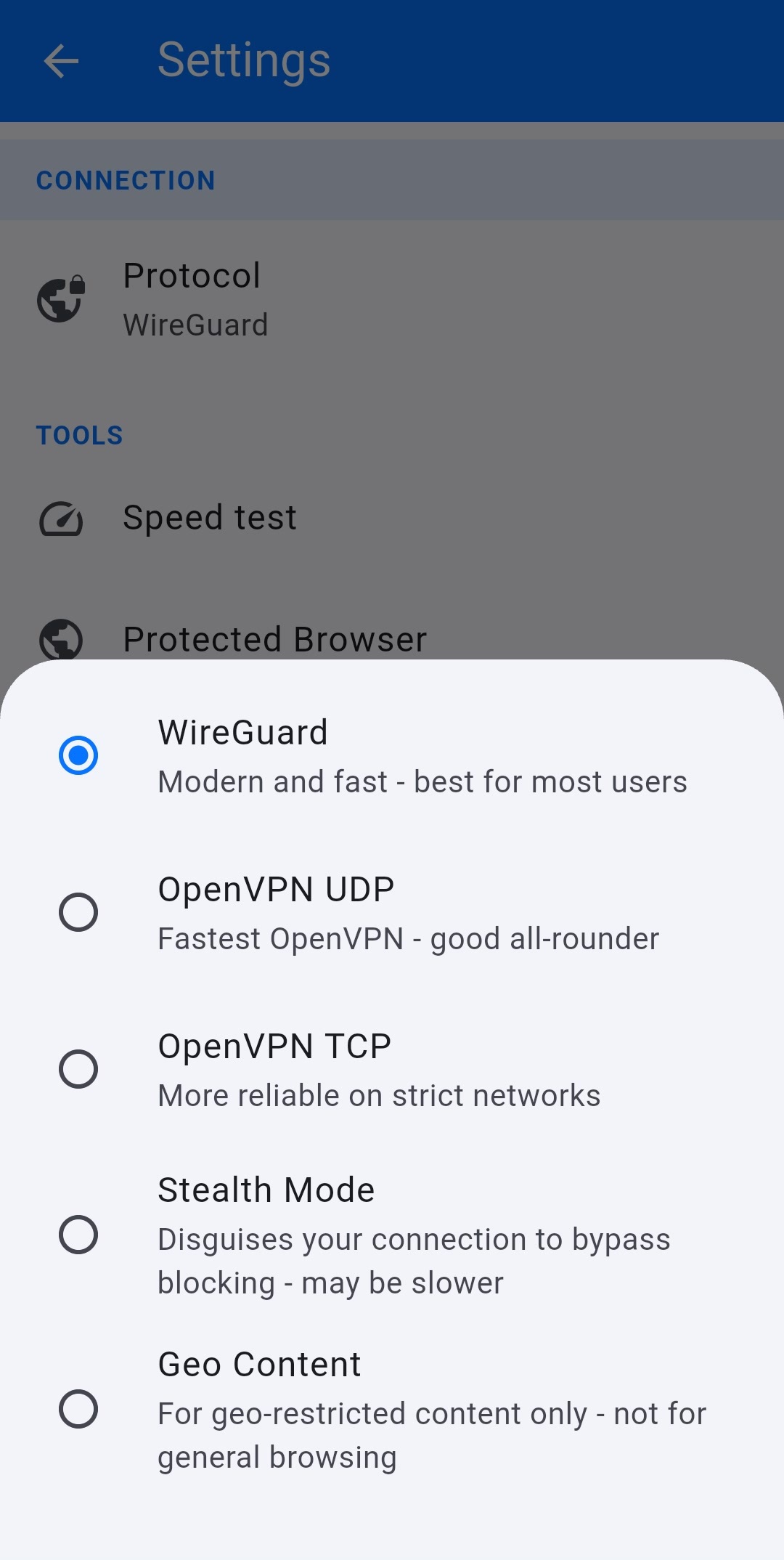
In the VPN Safe app you pick how you connect. WireGuard for everyday speed, OpenVPN when a network is awkward, Stealth when something is trying to block you.
Geo Content is for location-locked TV only — not a full VPN. The cards below open each option.
Modern and fast — best for most users. Light on the battery, quick to connect, and the protocol we recommend leaving on.
Your device and the server swap keys, then send encrypted UDP packets. No bulky handshake sitting in the way.
Fastest OpenVPN — a good all-rounder. Same trusted encryption as TCP, without waiting for every packet to be acknowledged.
Use it when you want OpenVPN rather than WireGuard, and the network in front of you is not dropping UDP.
More reliable on strict networks. Hotel Wi-Fi, some offices, and a few mobile networks treat UDP badly. TCP gets through more often.
The trade-off is speed. Use this when UDP will not connect, not as your everyday choice.
The app wraps OpenVPN TCP inside an HTTP CONNECT proxy so strict networks mostly see ordinary web traffic.
A normal VPN encrypts your data, but firewalls can still spot the protocol. Obfuscation hides that fingerprint so the connection looks like everyday web browsing. How Stealth Mode works
The app locks the protocol to OpenVPN over TCP. UDP is left off — it is too easy for DPI to fingerprint and drop.
A plain TCP socket is opened to the VPN server on port 8001. Squid is listening there — not the OpenVPN daemon yet.
Sends an HTTP CONNECT request with the account username and password as Basic auth. Still cleartext — encryption has not started.
Squid returns 200 Connection established and becomes a dumb pipe. From here it just forwards bytes to the OpenVPN daemon.
OpenVPN runs its normal TLS handshake inside that pipe and builds the encrypted tunnel. The wrapper is finished.
Apps on the device send traffic through the tunnel as usual. To the network in front of you it still looks like a web-style TCP session.
On Android, open Settings and tap Protocol. The list is the same five options you see here, with a short line under each so you know what it is for.
Leave WireGuard selected unless something is wrong. If a network will not connect, step down the list: OpenVPN UDP, then TCP, then Stealth. Geo Content is a different tool altogether — it is not a VPN.
The rest of this page is the longer version of those one-liners: what each protocol actually does, and when to use it.
The cards above are the short version. Below is when to use each one, and what it actually does.
WireGuard is a modern VPN protocol with a small, audited codebase. Your device and the VPN server each have a key. They use those keys to agree a session, then send encrypted UDP packets back and forth. That is the whole tunnel.
There is no large TLS stack sitting in the middle, which is why it connects in about a second and stays light on phones. It is the default for most people: everyday browsing, commuting, and streaming when a data-centre IP is enough.
If WireGuard connects, leave it on. Switch only when a network in front of you is dropping UDP, blocking VPN fingerprints, or you need a residential IP for a location-locked service.
OpenVPN has been around for decades and is the protocol most routers, firesticks and third-party apps already speak. It wraps your traffic in TLS, then sends that encrypted stream as UDP packets.
UDP does not wait for every packet to be acknowledged. If one drops, it moves on. That makes OpenVPN UDP the faster of the two OpenVPN options, and a solid all-rounder when you want the classic protocol rather than WireGuard.
Use it if WireGuard is unavailable on the device, you are importing a config, or you simply prefer OpenVPN. If it will not connect, try TCP next — some networks silently discard UDP.
Same OpenVPN encryption, sent over TCP instead of UDP. TCP retries lost packets and looks like a normal reliable stream, which is why it survives hotel Wi-Fi, locked-down offices, and mobile networks that quietly drop UDP.
The cost is speed. Putting a VPN tunnel on top of TCP can stall on a lossy connection, because both layers try to recover the same missing packets. That is why the app labels it “more reliable on strict networks”, not “faster”.
If OpenVPN UDP fails and you do not need to hide the fact you are on a VPN, this is the next stop. If the network is blocking VPNs on purpose, skip to Stealth Mode.
Some networks do not just slow a VPN down — they look for one and block it. UDP is easy to fingerprint. Stealth Mode hides the handshake so the network in front of you mostly sees ordinary web-style TCP traffic.
The app forces OpenVPN over TCP, then wraps that session. You still get a full encrypted tunnel once it is up. It can be slower than WireGuard or OpenVPN UDP, which is the trade-off for getting through.
Geo Content is not a VPN. It does not encrypt your traffic, and it does not protect you the way WireGuard or OpenVPN do. The only thing it changes is the IP address that websites see.
It is built for location-locked services: BBC iPlayer, ITV, and other sites that check you are on a real ISP in that country — including some gambling sites. The first time you turn it on, the app shows a popup making that clear. It is not for everyday browsing.
A normal VPN exits from a server in a data centre. Streaming platforms and a lot of geo-fenced sites have learned to spot those addresses and block them. That is why iPlayer or a similar service can fail even when the VPN is connected and your IP looks British.
Geo Content sends you through our own proxy, then out through residential ISP connections in that location. To BBC iPlayer or ITV, you look like a household on a local broadband provider, not a VPN server.
Those residential exits are replaced from time to time. When one gets flagged, we swap the output IP. The proxy in front of it stays the same, so you do not have to change anything on your side — it just keeps working.
Use it to watch or log in to geo-restricted services. Do not leave it on as your daily connection. There is no encrypted tunnel here, only a different IP.
Start at the top of the list and only move down if you have a reason.
| Protocol | Encrypted VPN? | Speed | Use it when |
|---|---|---|---|
| WireGuard | Yes | Fastest | Everyday use — the default |
| OpenVPN UDP | Yes | Fast | You want classic OpenVPN and UDP is allowed |
| OpenVPN TCP | Yes | Moderate | Hotel, office, or other picky networks |
| Stealth Mode | Yes | Slower | The network is blocking VPNs |
| Geo Content | No — IP change only | Fast | iPlayer, ITV and other geo-locked services |
No payment. The full app, the same servers. Keep the account after if you want.
Six-monthly is 20% off. Yearly is 40% off.
Start Free TrialVPN Safe encrypts your connection, replaces your IP, and runs on the devices you already use — phone, laptop, Android TV, and Firestick. WireGuard for speed, OpenVPN when a network is awkward, Stealth when something is blocking VPNs.
No connection logs. Unlimited bandwidth. One account for the household. A VPN you pay for, so the product is privacy — not your browsing history.
Connect to a UK server and keep BBC iPlayer, Netflix, and Prime Video in the picture — on the phone or on the big screen with our Android TV and Firestick apps.
WireGuard is the everyday default: light, quick, and stable on phones. Unlimited bandwidth means you are not metering a commute, a film, or a download.
Websites and advertisers see the server location you picked, not the one your ISP assigned. 57 cities across 39 countries — pick for privacy, streaming, or travel.
Our VPN servers run entirely in RAM — nothing is written to disk. A reboot wipes the slate clean, so there is nowhere for connection data to linger.
Install the app, sign in, hit Auto (Fastest). No hunting through a server list every time you leave the house — unless you want to pick a city yourself.
We do not keep connection logs. Your traffic is encrypted before it leaves the device, and what you do online is not sitting in our files.
Our network spans 39 countries, so you can choose a nearby city for a short, fast path — or hop to another region when you need a different IP. Streaming UK catch-up? Connect to a UK server. Travelling and want home-country access? Pick that city instead. Same login on every device; the map is just how you choose where your traffic exits.
Hover a pin to see the city name. Every location below is live and ready on your account.
Stuck on setup, billing, or which protocol to use? Send a message and we will get back to you.
Support is open every day. Include your account email if you already have one — it saves a round trip.

24 hours, every day. Most replies land within a few hours.


App setup, OpenVPN, WireGuard, Stealth Mode, billing, and account access.